Summary: In this tutorial, you’ll learn how to use the Dart if statement to execute a code block based on a condition.
Introduction to the Dart if statement #
An if statement allows you to do something only if a condition is true. Here’s the syntax of the if statement:
if (condition)
   statement;Code language: Dart (dart)
In this syntax, if the condition is true, the if statement executes the statement. But if the condition is false, the if statement won’t execute the statement.
If you want to execute multiple statements, you need to place them in curly braces like this:
if (expression) {
    // statement;
    // statement;
}Code language: Dart (dart)
It’s a good practice to use a block with the if statement even though it has a single statement.
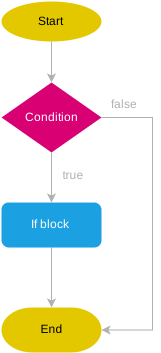
The following flowchart illustrates how the Dart if statement works:
Dart if statement examples #
The following examples demonstrate how the if statement works.
1) A simple Dart if statement example #
The following example uses the if statement to show a message when the isWeekend is true:
void main() {
  bool isWeekend = true;

  if (isWeekend) {
    print("Let's play!");
  }
}
Code language: Dart (dart)
Output:
Let's play!Code language: Dart (dart)How it works.
- First, declare a boolean variable
isWeekendwith the valuetrue. - Second, display the message
"Let's play!"if theisWeekendis true. Since theisWeekendis true, the program shows the message.
2) Dart if statement with a condition evaluates to false #
The following program doesn’t display anything because the isWeekend is false. Therefore, the if statement doesn’t execute the print statement between the curly braces:
void main() {
  bool isWeekend = false;

  if (isWeekend) {
    print("Let's play!");
  }
}
Code language: Dart (dart)
3) Dart if statement example with a complex condition #
In practice, the condition of the if statement this more complex, which consists of multiple expressions like this:
void main() {
  bool isWeekend = true;
  String weather = "sunny";

  if (isWeekend && weather == "sunny") {
    print("Let's go to the park!");
  }
}
Code language: Dart (dart)
Output:
Let's go to the park!Code language: Dart (dart)Nested Dart if statement #
Dart allows you to nest if statements inside an if statement. Here is an example:
void main() {
  bool isWeekend = true;
  String weather = "rainy";

  if (isWeekend) {
    if (weather == "sunny") {
      print("Let's go to the park!");
    }
    if (weather == "rainy") {
      print("Let's play computer game at home!");
    }
  }
}
Code language: Dart (dart)
Output:
Let's play computer game at home!Code language: Dart (dart)How it works.
- First, declare the
isWeekendandweathervariables and initialize their values totrueand"rainy". - Second, check if the
isWeekendistruein theifstatement. Because theisWeekndistrue, theifstatement executes the statement inside its block. - Third, check if the
weatheris"sunny"in the first nestedifstatement. Since theweatheris"rainy", the first nestedifstatement does do anything. - Finally, check if the
weatheris"rainy"in the second nestedifstatement. Because theweatheris"rainy", theifstatement executes its body that displays the message"Let's play computer game at home!".
Even though you can nest if statements, you should always avoid doing this. Because nested if statements make the code difficult to read and maintain. It’s a good practice to use flat if statements. For example, you can flatten the example above using two if statements like this:
void main() {
  bool isWeekend = true;
  String weather = "rainy";

  if (isWeekend && weather == "sunny") {
    print("Let's go to the park!");
  }
  if (isWeekend && weather == "rainy") {
    print("Let's play computer game at home!");
  }
}
Code language: Dart (dart)
Summary #
- Use the
ifstatement to execute one or more statements when a condition istrue. - Avoid using nested
ifstatements to make the code easier to read.

