Summary: In this tutorial, you’ll learn how to use the Dart if else if statement to check multiple conditions and do something if a condition is true.
Introduction to the Dart if-else-if statement #
The if statement checks a condition, only does something if the condition is true.
The if else statement checks one condition and does something if a condition is true or another thing if the condition is false.
Therefore, both the if and if else statements allow you to do something based on the result of one condition.
To do something based on the result of multiple conditions, you use the if else if statement.
The following shows the syntax of the if else if statement:
if (condition1)
{
    // statement 1
}
else if (condition2)
{
    // statement 2
}
else if (condition3)
{
    // statement 3
}
else
{
    // else statment
}Code language: Dart (dart)
In this syntax:
- The
if else ifstatement may have multipleelse ifclause where each clause checks a condition. - The
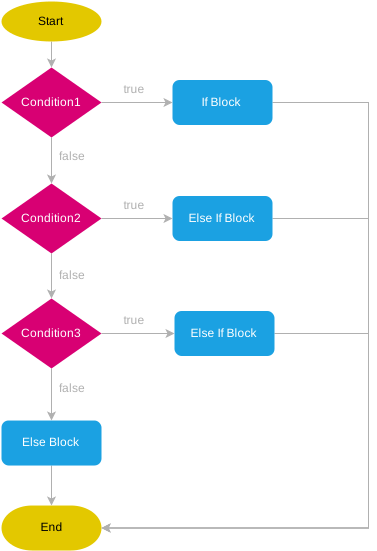
if else ifstatement checks thecondition1,condition2, … from top to bottom sequentially. If a condition istrue, it executes the corresponding block that follows the condition. The statement will stop evaluating the remaining conditions as soon as a condition istrue. - If no condition is
true, the statement in theelseclause executes. Theelseclause is optional. It means that if you omit theelseclause and no condition istrue, theif else ifstatement doesn’t do anything.
The following flowchart illustrates how the if else if statement works:
Dart if-else-if examples #
The following examples illustrate how to use the if else if statement.
1) Simple Dart if-else-if statement example #
The following example shows how to use the if else if statement to display the day name based on a day number entered by users:
void main() {

  String season = "";
  String month = "Feb";

  if (month == "Jan" || month == "Feb" || month == "March") {
    season = "Spring";
  } else if (month == "Apr" || month == "Jun" || month == "July") {
    season = "Summer";
  } else if (month == "Aug" || month == "Sep" || month == "Oct") {
    season = "Autumn";
  } else if (month == "Nov" || month == "Dec" || month == "Jan") {
    season = "Winter";
  } else {
    season = "Invalid";
  }

  print(season);
}Code language: Dart (dart)
Output:
SpringCode language: plaintext (plaintext)How it works.
- First, declare the
seasonandmonthvariables and initialize their values to""and"Feb". - Second, use the
if else ifstatement to assign a value to theseasonvariable based on the value of themonth.
2) Using the Dart if-else if statement to develop a body mass index calculation program #
The body mass index (BMI) is a person’s weight in kilograms divided by the square of height in meters. The BMI classifies a person’s weight category as underweight, healthy weight, overweight, and obesity.
The following program calculates the body mass index (BMI):
void main() {
  double weight = 80;
  double height = 1.9;
  double bmi = weight / (height * height);

  String status = "";

  if (bmi < 18.5) {
    status = "Underweight";
  } else if (bmi >= 18.5 && bmi <= 24.9) {
    status = "Healthy Weight";
  } else if (bmi >= 25 && bmi <= 29.9) {
    status = "Overweight";
  } else {
    status = "Obesity";
  }

  print("BMI $bmi: Status: $status");
}Code language: Dart (dart)
How it works.
First, declare the height and weight variables and assign the values:
double weight = 80;
double height = 1.9;Code language: Dart (dart)
Second, calculate the BMI number:
double bmi = weight / (height * height);Third, assign the status based on BMI:
String status = "";

if (bmi < 18.5) {
  status = "Underweight";
} else if (bmi >= 18.5 && bmi <= 24.9) {
  status = "Healthy Weight";
} else if (bmi >= 25 && bmi <= 29.9) {
  status = "Overweight";
} else {
  status = "Obesity";
}Code language: Dart (dart)
Finally, show the BMI result and the status:
print("BMI $bmi: Status: $status");Code language: Dart (dart)Summary #
- Use the Dart
if else ifstatement to check multiple conditions and do something if a condition istrue.

